The Customer Success Automation Playbook: 25 Automations CS Teams Run Today
By Divya Singh · Customer Success Manager, Statisfy
Statisfy customers are turning repeatable CS work into automations their own teams build and own. Customer emails that send themselves, CRM fields that stay current without anyone typing into them, and risk that gets flagged and routed before a renewal slips.
This playbook covers five categories of automation, the 25 use cases customers have actually launched across them, and what those teams say about the impact. For the conceptual version of where the line between AI work and human work belongs, see what AI can automate in customer success.
The five categories of work
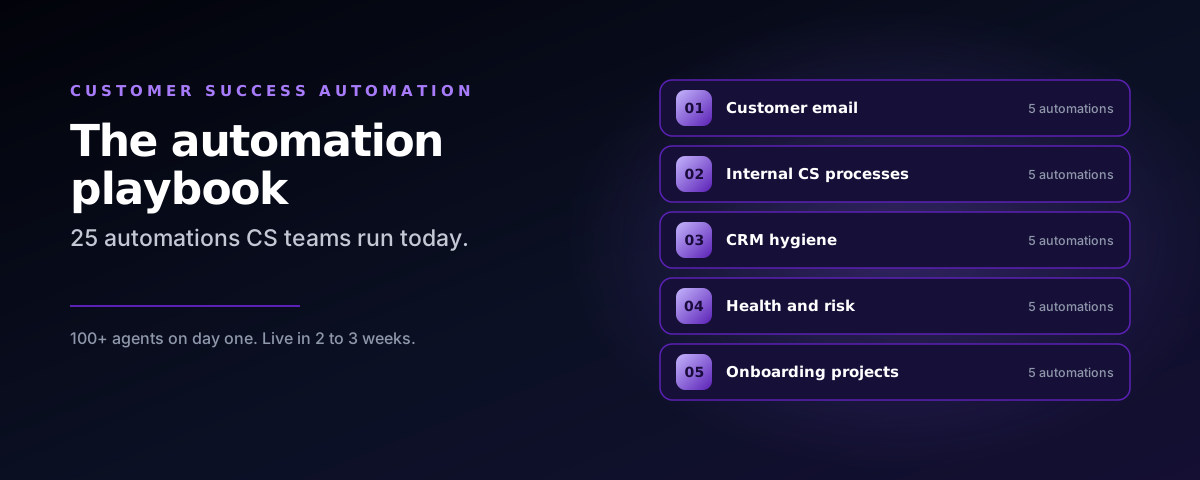
Nearly every automation CS teams run falls into one of five buckets. The catalogue below is organised around them.
| Category | What it covers |
|---|---|
| 01 Customer email | Welcome, renewal, health and survey outreach, sent from the CSM, at scale |
| 02 Internal CS processes | Survey results actioned, weekly priority digests, risk escalations, account transitions and account plans |
| 03 CRM hygiene | Next steps, renewal notes and contact updates, written back to Salesforce |
| 04 Health and risk | Renewal, health and QBR signals, risk mitigation plans, and alerts on usage drops and exec changes |
| 05 Onboarding projects | Sales to CS handoff, onboarding projects managed, and CSM changes handled |
Outcomes customers see: 100+ agents from day one, 20%+ CSM productivity, a 2 to 5%+ NRR increase, and a platform live in 2 to 3 weeks.
Agents that act, not just inform
The work does not stop at the insight. Some agents run when a CSM asks. Others fire on their own when something changes in the customer graph. Either way the action lands in the system of record rather than in a notification someone has to chase.
Agent Studio: where CS Ops builds it
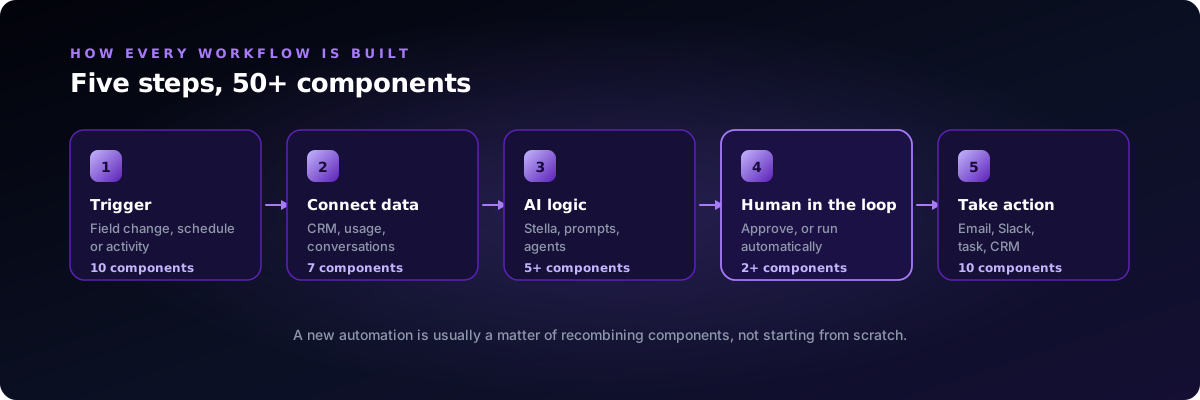
Agent Studio is where these workflows get built and owned, with no engineering work: more than 50 out of the box components, drag and drop, in a builder that behaves like the Zapier your team already knows.
| Component family | Count | What it does |
|---|---|---|
| Triggers | 10 | Start on a field change, a schedule, or an activity such as a meeting, email, support case, Slack message or survey response |
| Data processing | 7 | Pull account, opportunity, contact and transcript data, then parse, filter and combine it |
| AI and LLM | 5+ | Classify, summarize and draft with Stella, prompts or prebuilt agents |
| Logic and human in the loop | 2+ | Branch on conditions, wait, listen for replies, and route drafts for approval |
| Actions | 10 | Send email from the CSM, post to Slack, create tasks, projects, cases and documents |
| Field updates | 7 | Write results back to Statisfy and Salesforce fields |
See these mapped to your own CS processes
Your Statisfy team can walk your current workflows against these five patterns and show you which two or three to automate first.
01. Customer email: personal outreach at digital scale
Customer email automations send the right message at the right moment, from the CSM’s own address and in your brand, without a CSM writing each one. Jump uses them to cover more than 4,000 digitally supported customers, and its automated emails reached a 76% open rate in early 2026.
| Automation | Trigger | What it does |
|---|---|---|
| Welcome and kickoff | Account becomes a customer | Sends a welcome email from the CSM with a link to book kickoff, then waits a week and nudges if there is no reply |
| Evergreen renewal campaigns | Renewal date approaching, from Stripe and Salesforce data | Sends renewal emails to the SMB book on a rolling basis, with no manual list pulls |
| Low health outreach | Health score below 60 and renewal within 180 days | Sends a templated check in from the CSM, copies the shared CS inbox, and follows up until the customer replies |
| NPS detractor response | Survey score of 6 or below | Sends a personal reply from the CS lead with the CSM copied, with optional approval before it goes |
| Trial and adoption follow ups | 15 days after a customer starts a trial | Sends the next email in the sequence, built once in Email Builder and reused for every cohort |
How teams control it: human in the loop approval for sensitive messages, reply listeners that stop a sequence when the customer answers, and one email template reused across every workflow.
“They’re kind of evergreen. They kind of take care of themselves and continue to send out renewals based on data that we’re pulling from Stripe and Salesforce.”
Skylar Yenchik, SMB Customer Success Manager, Jump
02. Internal CS processes: operations that run themselves
The CS operations work that used to live in spreadsheets and inboxes, such as survey chasing, case creation, escalation routing and weekly roll ups, now runs on its own. One enterprise customer ran its second annual customer experience survey this way, and Milestone built seven new Agent Studio workflows in a single week.
| Automation | Trigger | What it does |
|---|---|---|
| Annual customer experience survey | No response a week after the survey goes out | Sends follow ups that come from each CSM’s own address and signature, and logs every detractor and promoter |
| Detractor case management | A contact submits a detractor score | Creates the Salesforce case automatically and notifies the CSM and solution expert who own the account |
| New product introduction tracker | Weekly schedule | Keeps an account by account view of new product rollout and flags accounts that need a CSM action |
| Escalation routing | Escalation raised, or its department changes | Emails the department head and the shared escalations inbox with account context, so nothing waits in a queue |
| Leadership digests | Monday and daily schedules | Sends leaders a weekly list of cancelled accounts and a daily summary of negative sentiment support cases |
“Last year NPS surveys were very manual, very heavy handed. With Statisfy this year, all of that was actually automated. The case creations were all automated. The follow ups that CSMs did manually last year individually for every contact, Agent Studio allowed us to send automatically, but make it still look personalized.”
Tammy Chun, Customer Success Operations, Eightfold
03. CRM hygiene: Salesforce that stays current on its own
CRM hygiene automations read every meeting, email and support case, draft the update a CSM would have typed, and write it back to Salesforce, with the CSM approving first wherever you want a human check. At Birdeye, AI drafted CSM next steps now sync to Salesforce in the team’s existing format, replacing a weekly manual update.
| Automation | Trigger | What it does |
|---|---|---|
| Weekly CSM next steps | Weekly schedule | Drafts a short account update in the team’s format from the week’s activity, routes it for approval, then syncs it to the Salesforce account |
| Renewal next steps | Renewals due in the next 6 months | Writes a weekly renewal status to the renewal opportunity’s next step field, so forecasts reflect what is actually happening |
| Post meeting field updates | A customer meeting ends | Proposes updates to next steps and key fields from the conversation, and the CSM approves them in one click |
| Missing contact detection | Weekly schedule | Finds people who are active with your team, 15 or more interactions in 90 days, but missing from Salesforce, and asks the CSM to add them |
| Product SKU change alerts | An account’s product SKUs change | Flags the change to the owning CSM with account context, so records and plans stay aligned |
Why it holds up: changes are reviewed in the Approvals queue before they write back, sync is bi-directional with Salesforce, and admins choose exactly which fields Statisfy may update.
“Making the CSM next steps automatically update is a huge, huge, huge win.”
Shunail Jiwani, Customer Success leader, Birdeye
04. Risk mitigation: from signal to owned action
Risk automations turn health, renewal and engagement signals into an action with an owner and a deadline, before the renewal conversation starts. Birdeye CSMs now get a renewal brief 90 days out for every account in their book, with risk signals, key contacts and a commercial snapshot in one email. If you are still designing the underlying score, see how to build a health score that actually predicts churn.
| Automation | Trigger | What it does |
|---|---|---|
| 90 day renewal brief | Renewal is 90 days away | Emails the CSM, with their manager copied, a renewal risk tier, the reasons behind it, key contacts and a commercial snapshot |
| QBR gap alert | No QBR in the last 90 days | Summarizes the last touchpoint and open risk flags, and recommends the next best step for scheduling the review |
| Negative health alert | Account health turns negative | Notifies the CSM and manager with the explanation, and drafts customer outreach for approval before it is sent |
| Health based renewal path | Renewal approaching | Healthy accounts get a courtesy renewal note automatically, and at risk accounts get a CSM approved personal email instead |
| Early churn case sequence | Early churn indicators appear | Opens a case for the CSM playbook and runs a follow up email sequence that stops as soon as the customer replies |
Keeping the signal high: alerts go only where someone will act on them, duplicate tasks are cleaned up automatically, and managers see every open risk action in one dashboard.
“Whenever someone cancels, it immediately sends them a message that day. And I think I’ve saved multiple subscriptions by doing that. And it’s all automated.”
Customer Success team member, Jump
05. Onboarding and account transitions: no context lost in the handoff
The moments where context usually gets lost are when sales hands a new customer to CS, and when an account changes CSMs. Onboarding automations handle both, orchestrating the customer facing welcome and the internal setup from one trigger. At Jump, every new customer gets a welcome email and the team gets an onboarding kickoff notice in Slack, with no manual step.
| Automation | Trigger | What it does |
|---|---|---|
| Welcome sequence | Opportunity closed won | Sends a welcome email from the CSM with a kickoff booking link, optionally approved first, waits a week, and follows up only if the customer has not replied |
| Sales to CS handoff | Opportunity closed won | Stella writes a handoff document from sales calls, emails and Salesforce: why they bought, their goals and key contacts, and the CSM gets it in Slack or email |
| Onboarding project setup | New customer | Creates the onboarding project from your template with milestones, owners and due dates, and links it for the CSM |
| Account handover briefing | Account moves to a new CSM | Generates a briefing with key contacts, relationship history, open tasks, support issues and sentiment, so the new owner starts informed |
| Weekly onboarding actions | Weekly schedule | Sends each CSM the open actions and stalled milestones across their onboarding accounts |
“A single consistent view of our customers, and reducing fragmented or duplicated efforts.”
Tammy Chun, Customer Success Operations, Eightfold
Getting started
Standard agents such as the Monday priority email, meeting prep and renewal alerts start working as soon as your data is connected. From there, teams typically pick a few automations at a time, starting from Statisfy templates and tuning prompts and audiences to their own playbooks.
The sequencing that works is to start where the work is most repetitive and least judgement heavy, which is usually customer email and CRM hygiene, then move into risk once the health signals have been tuned against your own renewal history.
Frequently asked questions
What can customer success teams actually automate?
Five categories cover most of it. Customer email, such as welcome, renewal, low health and survey outreach sent from the CSM's own address. Internal CS processes, such as survey follow ups, case creation, escalation routing and leadership digests. CRM hygiene, such as next steps, renewal notes and contact updates written back to Salesforce. Health and risk, such as renewal briefs, QBR gap alerts and negative health escalations. Onboarding and account transitions, such as the sales to CS handoff and CSM change briefings.
What is Agent Studio?
Agent Studio is where CS Ops builds and owns automation workflows with no engineering work. It offers more than 50 out of the box components across triggers, data processing, AI and LLM steps, logic and human in the loop, actions, and field updates, assembled by drag and drop in a builder that works the way Zapier does. Every workflow follows the same five steps, so a new automation is usually a matter of recombining components rather than starting from scratch.
Do automated emails still feel personal to the customer?
They send from the CSM's own address and signature rather than a no-reply alias, which is what keeps them personal. Jump covers more than 4,000 digitally supported customers this way and its automated emails reached a 76% open rate in early 2026. Reply listeners stop a sequence the moment a customer answers, so nobody receives a follow up after they have already responded.
How do you keep automation safe when it writes to the CRM or emails customers?
Human in the loop approval. Sensitive messages and CRM writebacks route to an Approvals queue where a CSM confirms before anything sends or saves. Admins choose exactly which fields Statisfy may update, Salesforce sync is bi-directional, and each workflow can be set to run autonomously or to require approval, so the control level matches the risk of the action.
How long does it take to get customer success automations running?
Standard agents such as the Monday priority email, meeting prep and renewal alerts start working as soon as your data is connected, and most teams are live in 2 to 3 weeks. From there teams typically pick a few automations at a time, starting from Statisfy templates and tuning the prompts and audiences to their own playbooks. Milestone built seven new Agent Studio workflows in a single week.
What is the difference between an on demand and an autonomous agent?
On demand agents run when a CSM asks for them, producing things like a stakeholder map, an account plan, a meeting prep brief or an instant answer from Stella in about 10 seconds. Autonomous agents are event triggered and run without the CSM, handling risk escalations, renewal reminders at 90, 60 and 30 days, NPS follow up with a Salesforce case, CRM hygiene, and onboarding milestones and alerts.
Map your own processes
Your Statisfy team can take your current CS processes, match them to these five patterns, and help you choose where to begin. Most teams find they already have three or four automations worth building in the first week.
Build your first three automations
20 minutes on your own processes. We will show you which of these 25 map to the work your team is doing by hand today.
Compare
How Statisfy compares.
Side-by-side, parameter-by-parameter comparisons with the CS platforms teams evaluate us against.
- Statisfy vs Gainsight Rule-based CTAs vs work already drafted.
- Statisfy vs ChurnZero Plays and ChurnScores vs zero-config action.
- Statisfy vs Vitally Playbook-and-Copilot vs work that's already done.
- Statisfy vs Totango + Catalyst Three products you stitch together vs one platform that acts.
- Statisfy vs Planhat Configurable system of record vs AI-native system of action.
- Statisfy vs Hook ML alerts vs the full loop from signal to autonomous action.
- Statisfy vs Staircase AI Gainsight's communication intelligence add-on vs standalone AI-native platform.